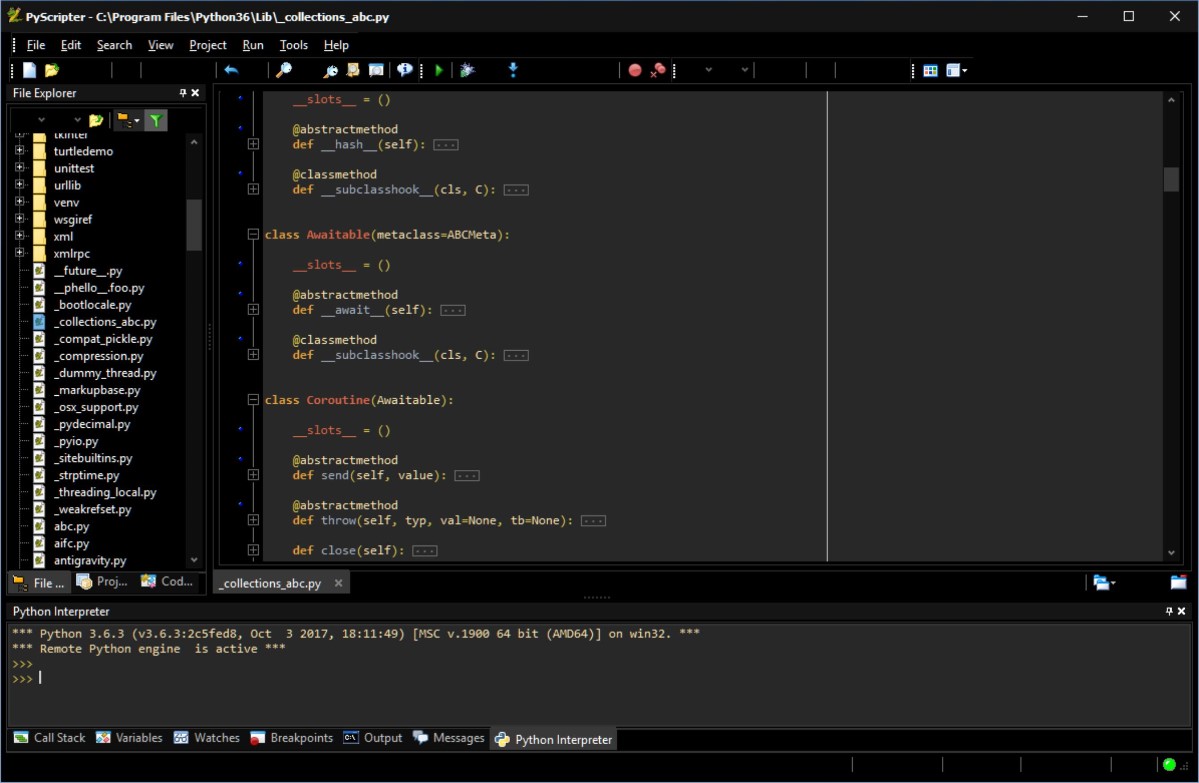
What is PyScripter
PyScripter is a free and open-source Python Integrated Development Environment (IDE) created with the ambition to become competitive in
functionality with commercial Windows-based IDEs available for other
languages.

Being built in a compiled language is rather snappier than some of the
other Python IDEs and provides an extensive blend of features that make
it a productive Python development environment.
About this site
Official releases of PyScripter as well as the source code (written in Delphi) are distributed by mmm-experts. The latest official release of PyScripter is version 1.7.2, which is the official release available from mmm-experts. Please visit that site to download the latest official release and view the version history.
This site provides beta releases and development snapshots as well as information about PyScripter development plans.
Donations
Donations to the PyScripter project will be much appreciated and encourage further development.
Latest Release
The most recent release is the unofficial release 1.9.9.2. Click here to download this release.
This new release contains support for remote debugging. Read this page for details. Please note that to use remote debugging you need to download and install the Python package Rpyc version 2.6 available for download here.
For more information have a look at the following pages:
- Remote Interpreter and Debugger
- Using matplotlib with PyScripter
- Debugging django applications with PyScripter
- Using PyScripter with Portable Python
- Shortcut and highlighter schemes
- Python 3.0 support
History: v 1.9.9.2
Changes since the last official release:
New features
- Remote interpreter and Debugger
- Python 2.6 and 3.0 support
- Project Explorer supporting multiple run configurations with advanced options
- New debugger command: Pause
- Execute selection command added (Ctrl-F7)
- Interpreter command history improvements:
- Delete duplicates
- Filter history by typing the first few command characters
- Up|Down keys at the prompt recall commands from history
- Code Explorer shows imported names for (from ... import) syntax (Issue 12)
- Improved sort order in code completion
- Save modified files dialog on exit
- Finer control on whether the UTF-8 BOM is written
- Three file encodings supported (Ansi, UTF-8, UTF-8 without BOM)
- IDE option to detect UTF-8 encoding (useful for non-Python files)
- IDE options for default linebreaks and encoding for new files
- Warning when file encoding results in information loss
- IDE option to position the editor tabs at the top
- IDE Windows navigation shortcuts
- Pretty print intperpreter output option (on by default)
- Pyscripter is now Vista ready
- Docking window improvements
- PYTHONDLLPATH command line option so that Pyscripter can work with unregistered Python
- Watches Window: DblClick on empty space adds a watch, pressing Delete deletes (Issue 45)
- Wrapping in Search & Replace (Issue 38)
- New IDE Option "Save Environment Before Run" (Issue 50)
- New IDE command Restore Editor pair to Maximize Editor (both work by double clicking the Tabbar)
- New IDE Option "Smart Next Previous Tab" (z-Order) on by default (Issue 20)
- Word Wrap option exposed in Editor Options
- New File Reload command
- Import/Export Settings (Shortcuts, Highlighter schemes)
- New IDE option "Auto-reload changed files" on by default (Issue 25)
- New menu command to show/hide the menu bar. The shortcut is Shift-F10 (Issue 63)
- New command line option --DPIAWARE (-D) to avoid scaling in VISTA high DPI displays (Issue 77)
- New command line option --NEWINSTANCE (-N) to start a new instance of PyScripter
- You can disable a breakpoint by Ctrl+Clicking in the gutter
- Syntax Errors are indicated by icon in the tabbar (Issue 93)
- Command to jump to the first syntax error (Shift+Ctrl+E)
- New Firefox-like search/replace interface
- Incremental Search (Issue 100)
- New command "Highlight search text" (Shft+Ctrl+H)
- New command line option --DEBUG (-B) to use debug version of Python dll (Issue 108)
- New command "Word wrap" visible in the Editor toolbar (Issue 112)
- New command "Go to Debugger Position" (Issue 118)
- The size of the auto completion list is now persisted
- Split Editor View (Issue 31)
- New parameter $[CmdLineArgs] that returns the active command line arguments and can be used with external tools
- New IDE options "Editor code completion" and "Interpreter code completion" which can be used to disable code completion
- New IDE option "Show Tab Close Button"
- New debugger command "Post mortem" (Issue 26)
- New IDE option "Post mortem on exception"
- Auto-resizing the fields of list views by double clicking on column separators
- Advanced search and replace external tool added (uses re.sub)
- Enhanced Execute Selection command (Issue 73)
- Two new IDE options added (Dock Animation Interval and Dock Animation Move Width - Issue 134)
- Toolbar customization
- Two new IDE options added ("Interpreter History Size" and "Save Command History") (Issue 131)
- Cut and copy without selection now cut and copy the current line (as in Visual Studio, Issue 64)
- Removed the Interpeter options "Clean up Namespace" and "Clean up sys.modules"
- Improved HTML, XML highlighting with code completion and Web preview
- C/C++ highlighting added
- Two new interpreter commands added: Copy without prompts, and Paste with prompts (Issue 183)
Bug fixes
- Shell Integration - Error when opening multiple files
- Configure External Run - ParseTraceback not saved properly
- Order of tabs not preserved in minimised docked forms
- sys.argv contained unicode strings instead of ansi strings
- Bug fixes and improvements in Editor Options Keystrokes tab (Issue 6)
- Better error handling of File Open and File Save
- Page Setup Header and Footer not saved (Issue 7)
- Hidden Tabbed windows reappearing when restarting
- Duplicate two-key editor command not detected
- "Clean up namespace" and "Clean up sys modules" settings become effective after restarting PyScripter
- Exception when setting the Active Line Color in Editor Options dialog
- Raw_input does not accept unicode strings
- Error in docstring extraction (Issue 11)
- Fixed some problems with the toggle comment command
- Fixed rare bug in restoring layout
- Code tips wrong if comments are present among parameters (Issue 15)
- Notification of file changes can miss files (Issue 17)
- Certain syntax coloring options were not saved
- ToDo List did not support encoded files and unicode
- ToDo List did not support multiline comments (Issue 14)
- Fixed bug in IDE Shortcuts dialog
- Swapped the positions of the indent/dedent buttons (Issue 23)
- Syntax highlighter changes to the interpreter are not persisted
- Multiple target assignments are now parsed correctly
- Gutter gradient setting not saved
- Disabling a breakpoint had no effect
- Tab order not preserved when restarting PyScripter
- Disassembly and Documentation views not working with remote engines
- More robust "Reinitialize" of remote Python engines (Issues 143, 145)
- Shift-Tab does not work well with the Trim Trailing Spaces editor option
- Issues 28, 32, 39, 40, 41, 46, 47, 48, 49, 52, 55, 56, 57, 65, 66, 67, 70, 71, 72, 74, 75, 76, 81, 82, 83, 86, 88, 90, 91, 92, 94, 96, 98, 99, 100, 102, 105, 106, 107, 109, 113, 117, 119, 120, 120, 122, 123, 125, 132, 134, 135, 136, 137, 138, 139, 140, 141, 146, 147, 150, 153, 155, 160, 164, 165, 166, 167, 168, 169, 171, 174, 178, 186, 193, 195, 196, 197 fixed
Support
Get support on PyScripter by emailing to pyscripter@gmail.com or by visiting the PyScripter internet group and posting your questions and comments. You may also use the project home at Google code hosting to view existing issues or report new ones.